
Manipulative Review: Ten-frames


Ten-frames are not well known in India. But they do have certain advantages and can be made very easily. There are also virtual ten-frames in several websites.
A ten-frame is a 2 × 5 frame with slots on which counters have to be put, to represent various numbers up to ten.
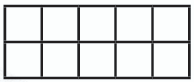
This is very useful at the beginning when children are learning to count. The act of putting counters on the frame requires eye hand coordination as well as the ability to count. There are two possible ways of representing numbers on ten-frames:
- Orient the frame as two rows and five columns. Fill the cells in the top row – left to right – and then the bottom one.

- Orient the frame as five rows and two columns. Fill the cells from the bottom most row – left, then right – and move up (Figure 3).

Both arrangements have certain advantages. Both help automatize1 the number pairs that add up to ten. This can be done in two ways – (i) consider the number of filled cells and that of empty ones, and (ii) use counters of two colours to fill the frame (Figure 4) – for either arrangement.

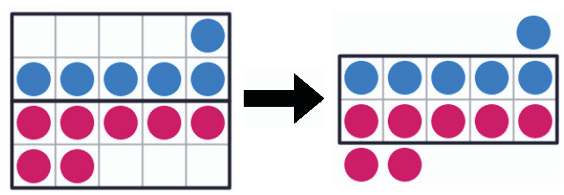
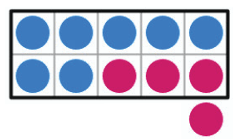
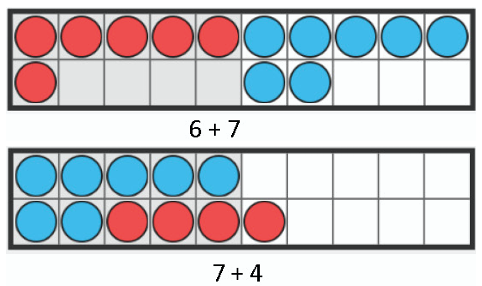
The first arrangement helps in automatizing single-digit addition facts, especially for sums greater than ten. Consider 6 + 7. If the first frame is rotated and put against the second one, then the two lines in the middle form a full frame, i.e., a ten. This and the remaining one and two add up to 13 (Figure 5). Here, 6 and 7 splitting into 5 + something is crucial. Others of this category are 5 + 6, 5 + 7, 5 + 8, 5 + 9, 6 + 6, 6 + 8, 6 + 9, 7 + 7, 7 + 8, 7 + 9, 8 + 8, 8 + 9 and 9 + 9. Similarly, one can also explore 7 + 4 (Figure 6), 8 + 3, 8 + 4, 9 + 2, 9 + 3 and 9 + 4.
So, when children play with the ten-frames at the beginning of learning numbers, they can generate these visuals themselves, start observing many things and make various connections.
The second arrangement essentially represents odd and even numbers. The names can be connected to the ‘shapes’ as follows:
- Odd: numbers which have a single at the top
- Even: numbers which have a pair at the top
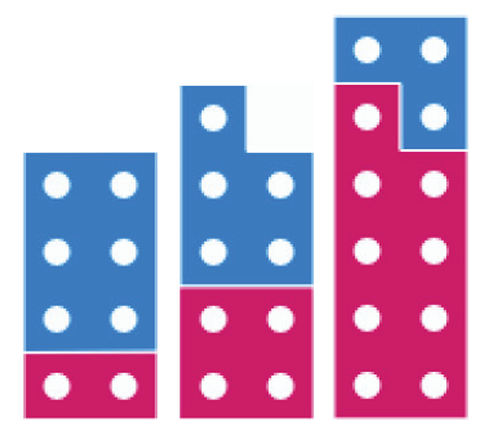
This representation can then be connected to the algebraic forms 2n + 1 or 2n – 1 for odd numbers and 2n for even ones. With this image, it becomes very clear what n stands for in each of these three cases: even 2n, odd 2n + 1 and odd 2n – 1.
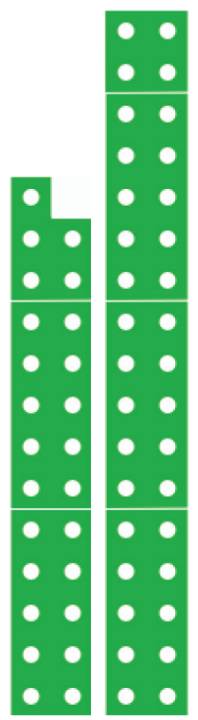
It also becomes clear what happens when these numbers are added (Figure 7). Clearly, adding an even number doesn’t change the parity since that (even) number aligns smoothly below the other number. Therefore, even + even remains even and odd + even remains odd. Also, one can see how the sum of two odd numbers is even since the ‘odd ones’ pair up! One can also discuss whether zero is odd or even and why.
More importantly, this can be extended to bigger numbers. Any number bigger than 9 is made of tens and ones. And if the number is hundred or more, at least some of the tens are in hundred or bigger groups. Nonetheless, all bigger groups, hundred, thousand, etc., are made of tens. So, all groups – ten, hundred, thousand, etc., – are even. Therefore, the number of ones determine the parity of any number. This can be clearly seen with ten frames – see how 25 or 34 look (Figure 8).
As mentioned earlier, several websites include virtual ten frames:
Toy Theater provides simple frame and counters in two colours. The user will have to put the counters on the frame similar to a real frame. However, the orientation of the frame is fixed, and it is not possible to use multiple frames. So, this is good for a beginner but has limited scope.
Math Learning Center provides a wide range of frames including the ten-frame as well as counters in two colours. Counters can be brought onto the screen as singles, in groups of fives and in groups of tens. The orientation of the frame can be changed, and multiple frames can be used simultaneously. Colours of the counters can be changed as well. The other pre-determined frames are 1 × 5, 2 × 10 and 10 × 10. The 2 × 10 frame may be useful for automatizing the addition facts for sums ≤ 20. They can provide alternative visuals corresponding to Figures 5-6 (Figure 9). This site definitely allows plenty of explorations going much beyond ten-frames.
Mathigon polypad includes ten-frames and counters in two colours. The orientation of the frame and the colours of the counters can be changed. Figures 4-8 have been generated using this site. So, multiple frames can be used as well. In addition, it also has the numbers pre-grouped in the odd-even format which have been used in Figures 7-8. These can provide a lot of exploration possibilities by allowing quick manipulation.
It is interesting that none of the sites provide the ‘5 + something’ pre-grouped version. However, those can be made easily. The Math Space site includes:
- How to make ten-frames – 3 versions including (i) empty frames for children, (ii) pre-filled frames for teachers, and (iii) pre-grouped (filled and cut) version – both odd-even and ‘5 + something’ – for older children and more
- Posters showcasing number patterns for addition – (i) using ‘5 + something’ and (ii) the odd-even layout
1 Ability to respond immediately almost without thinking, along with the ability to justify if asked (because the fact has been understood and internalized, this makes it different from rote learning).