
Manipulative Review: Geoboard


Unlike many other teaching learning materials (TLM) for math, which we would like to call mat(h)erials, geoboard is very well known among teachers and referred to in teacher education programs, pre-service in particular. It is a board – wooden or plastic, with many pegs or nails stuck on it. One can stretch a rubber band along some of these pegs to create many polygons. The pegs can be arranged in a rectangular array or in a few concentric circles (Figure 1).

Geoboards can be used to create shapes. The rectangular array version is a good precursor to the rectangular dot sheet. Check the Geometry and Geometry II Pullouts (At Right Angles, November 2014 and March 2015) for activities transitioning from tactile experiences, to drawing on paper, which are appropriate for young children to explore shapes (Figure 2). Geoboard is a good precursor to dot sheets because it provides a tactile experience, in which shapes can be changed much faster, and polygons are guaranteed straight sides. Moreover, it can be lifted up and displayed to the whole class.
At the primary level, i.e., Class 1-5, it can help with the following concepts:
- Polygons, i.e., closed 2D shapes with only straight edges
- Corners and edges – especially arriving at the relation between number of corners and number of sides of a polygon
- Identifying and creating rectangles in different orientations
- Exploring angles – possibly with two rubber bands acting as the two arms of the angle
- Comparing angles
Similarly, at the upper primary or middle school level, i.e., Class 6-8, geoboard can be used for the following concepts:
- Types of triangles – children can be asked to identify and/or make different types of triangles; these can be done on the circular geoboard as well
- Types of quadrilaterals – similar to the above
- Diagonals – can be shown with different coloured rubber bands
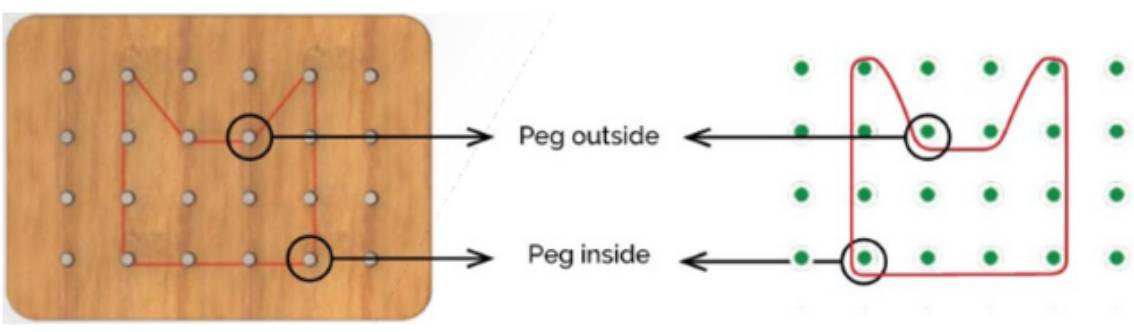
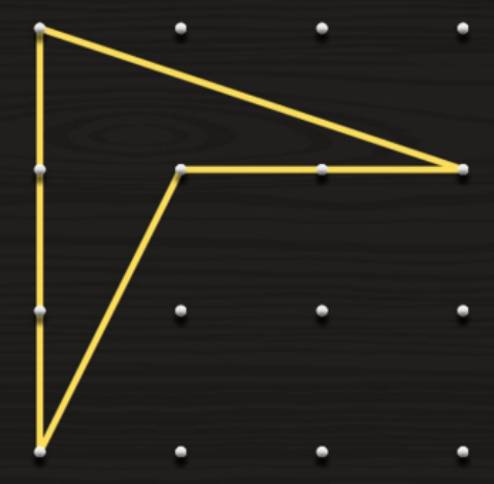
- Concave and convex polygons – Are all pegs inside the rubber band? What is special about the peg or vertex that is outside the rubber band?
Stretchability of regular rubber bands may be a limitation, and many rubber bands may snap while playing with a geoboard. Also, the pegs, because they are fixed, may come in the way. This can be resolved by using a softboard with pushpins replacing the pegs.
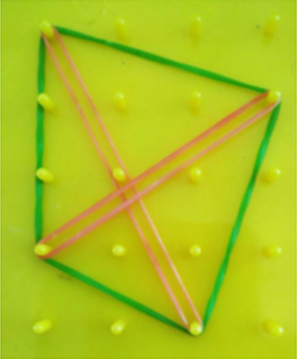
However, a geoboard illustrates the notion of concave and convex shapes perfectly. In a geoboard one can make a polygon and its envelope using two differently coloured rubber bands. Then it becomes clear if the envelope is congruent to the polygon in question. For a concave polygon, some of the sides of the enveloping polygon (shown in pink) will not match those of the concave one (shown in green). These unmatched sides of the envelope are diagonals of the concave polygon lying outside (Figure 3). Also, the vertex untouched by the envelope is special. The internal angle at the vertex is a reflex angle. In a physical geoboard, the peg corresponding to such a vertex lies outside the boundary of the concave polygon created by the rubber band, while the remaining vertices corresponding to angles < 180° lie inside.
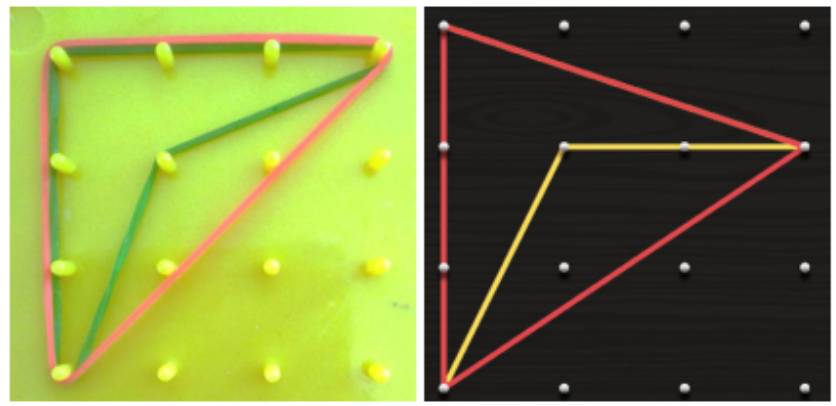
Virtual geoboards,such as https://apps. mathlearningcenter.org/geoboard/, are also available and a good substitute for the physical ones. They resemble the rectangular dot sheet more and the tactile aspect is reduced a bit. However, there is no restriction on the elasticity of the rubber bands and no chance of tearing those. They are available in multiple colours and can be stretched between just two points resembling a line segment much better than in a physical geoboard. So, it can show the diagonals of a polygon much better than its physical counterpart. Also, the pegs don’t come in the way (Figures 4 and 5).
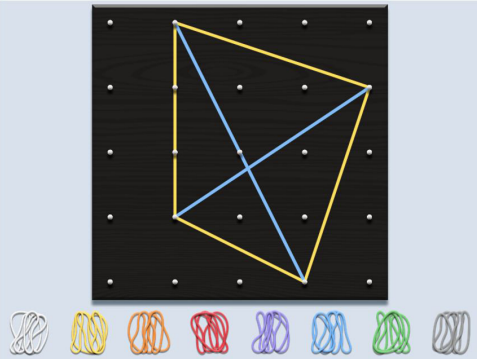
However, the virtual geoboard doesn’t distinguish a vertex corresponding to a reflex angle in a concave polygon as the physical geoboard does (Figure 6). Also, the rubber bands overlap exactly, hiding the one below completely. Check how the red envelope hides some of the (yellow) sides of the concave quad (Figure 3). It is uncertain if the virtual geoboard can be reprogrammed to address these issues.
Here is a worksheet based on geoboards.
- Geometry pullout: http://publications.azimpremjifoundation.org/3090/1/geometry.pdf
- Geometry II pullout: http://publications.azimpremjifoundation.org/1644/1/17_Teaching%20geometry%20-%20II.pdf
- Sikkim SCERT Math textbook, Class 2, pp.172-174: https://online.fliphtml5.com/iuwdn/kgob/#p=172